
How to Connect Snaplii to Muse — One-Time Setup, 3 Steps
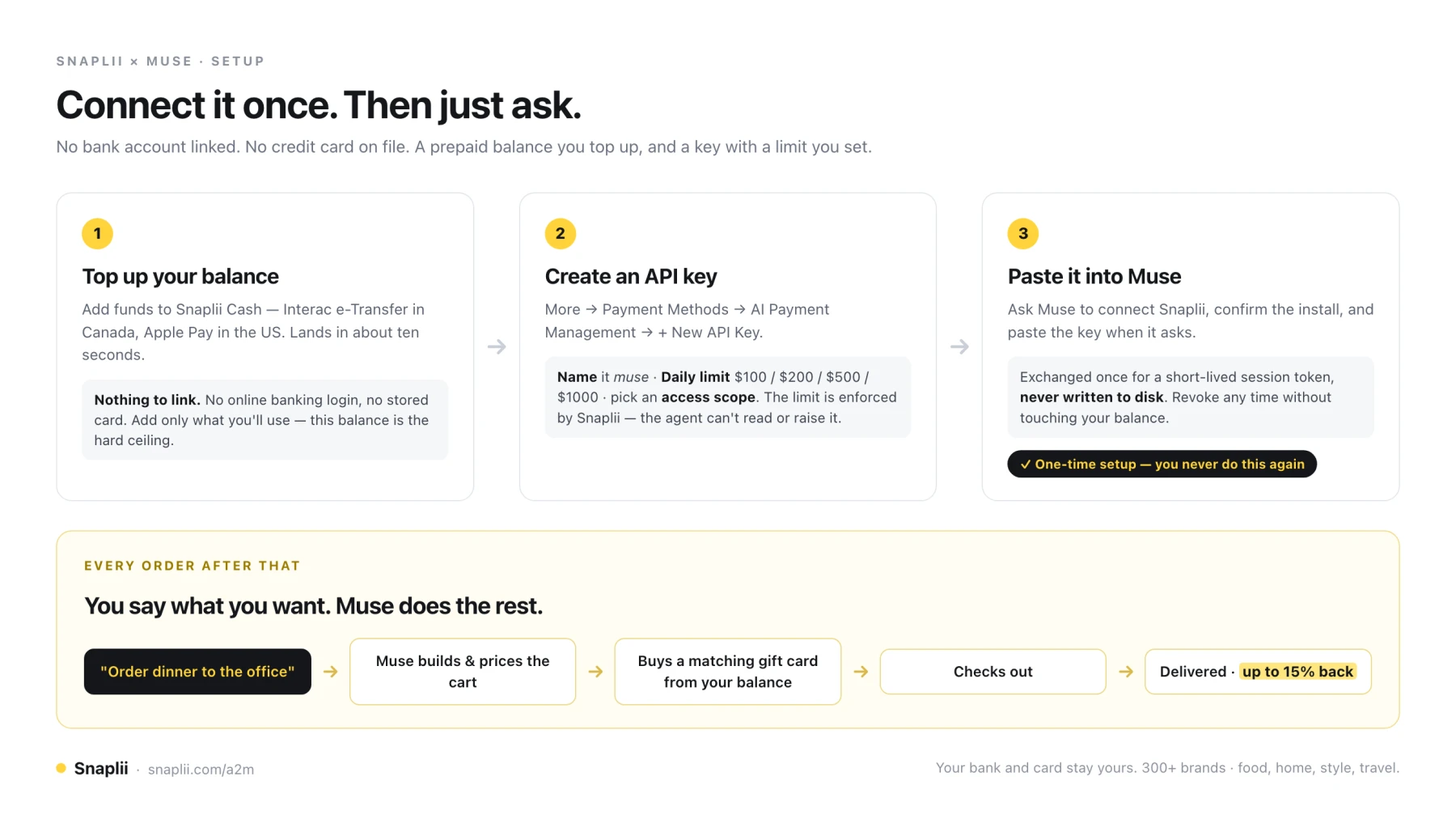
TL;DR — You link Snaplii to Muse once. Top up a prepaid balance, create an API key with a spending limit, paste it into Muse. That's the whole setup. After that you never touch it again: you just tell Muse what you want, and it buys the right gift card from your Snaplii balance and checks out for you. No bank account linked. No credit card on file. And every order earns cashback.
What you're actually setting up
Most AI agents ask for a credit card before they'll buy anything for you. That card then sits there permanently — your full credit limit, valid everywhere, reachable by software.
Snaplii works differently. You put money into a prepaid Snaplii Cash balance, and you give Muse a key that can only reach that balance. Not your bank account. Not your card. Just the amount you decided to put aside.
The setup takes a few minutes and you do it exactly once. From then on, ordering is a sentence.
Before you start: the Snaplii app (iOS or Android), and Muse. That's it.
The three steps at a glance
Step 1 — Top up your Snaplii Cash balance
Open the Snaplii app and add funds.
- In Canada: use Interac e-Transfer. The app shows you the recipient address and the message to paste into your bank's message field — copy both, send from your own bank app, and the funds typically land in about ten seconds.
- In the US: top up with Apple Pay.
Notice what did not happen here. You didn't connect a bank account. You didn't hand over online banking credentials. You didn't store a card. You pushed money from your bank to your balance, the same way you'd e-Transfer a friend — and the connection ends there.
Add only what you'll actually use. This balance is the hard ceiling on everything that follows, so treat it like cash in a wallet rather than a line of credit. You can top up again any time in ten seconds.
Step 2 — Create an API key, with a limit
In the Snaplii app, go to:
More → Payment Methods → AI Payment Management → + New API Key
Fill in three things:
| Field | What to enter |
|---|---|
| Key Name | Something you'll recognize — muse works |
| Daily Limit | $100, $200, $500 or $1000 |
| Asset Access | Either option works — pick whichever suits you |
Then tap Create.
The daily limit is worth a moment's thought. It's enforced by Snaplii, not by the agent — the agent can't read it, can't argue with it, and can't raise it. Start at $100. You can create a second key with a different limit later, or revoke this one instantly, without touching your balance.
That's two ceilings now stacked: the balance itself, and the daily limit on the key.
Step 3 — Paste the key into Muse. Once.
Back in Muse, ask it to connect Snaplii. Muse installs the Snaplii tooling — confirm when it asks — and then tells you exactly what it needs:
"The Snaplii tooling is installed. Now I need your Snaplii API key to sign in… I'll pipe it straight into the sign-in prompt: it's used once to get a session token and never stored on disk."
Paste the key. Done.
The key is exchanged immediately for a short-lived session token and is not written to disk. What Muse holds afterwards is a temporary credential that reaches one prepaid balance, under one daily limit.
This is the last time you do any of this. The connection persists. There is no step 4, and no repeat of steps 1–3 before your next order.
What happens every time after that
You talk. That's the whole interaction.
Say what you want — dinner delivered, household supplies, a gift — and Muse handles the rest in order:
- Finds the item and builds the cart.
- Prices it, including fees and tip.
- Buys a matching gift card from your Snaplii balance, sized to cover that total.
- Applies it at checkout and places the order.
- Reports back with the confirmation and the ETA.
You didn't ask for a gift card. You asked for dinner. Buying the card is Muse's job now, because that's how it pays — and it happens inside the order, without you doing anything.
The merchant sees an ordinary gift card at checkout. No integration on their side, no special account, nothing to set up. That's why this works across hundreds of brands on day one.
We ran exactly this end to end — we let Muse order coffee and pay for it, paid entirely from the Snaplii balance.
Why do it this way instead of linking a card?
Four reasons, and they're the whole argument.
1. Nothing to link means nothing to leak
There is no bank connection and no card on file. You never enter online banking credentials, and you never store a card number for an agent to reach. The only thing that exists is a prepaid balance you pushed money into.
That changes what a bad day looks like. Meta has been candid that Muse isn't immune to prompt injection — hidden text on a page can redirect what an agent does next. Nobody has solved that, including us. But a redirected agent holding a card reaches your credit limit; a redirected agent holding a Snaplii key reaches a prepaid balance, under a daily cap, at one merchant.
2. You set the limit — and it's enforced, not suggested
The daily limit lives on the key, in your app. The balance is a second ceiling underneath it, and that one is arithmetic: when it's empty, spending stops. Not a policy an agent could be talked out of. Not a setting buried three screens deep that you'll never find again.
3. Topping up takes ten seconds
Interac e-Transfer in Canada, Apple Pay in the US. No waiting period, no verification call, no linking flow. Add $50 before a grocery run, add nothing for a week — the balance is yours to manage, and an empty one simply means the agent can't spend.
4. It pays you back
This is the part that has no equivalent on the card side. Because Snaplii buys the gift card, every qualifying order earns cashback — up to 15% depending on the brand, across 300+ merchants spanning food, home, style and travel.
Same rates whether you tap the button or Muse does. It stacks on top of whatever promotion the merchant is already running. A card gives you nothing for letting an agent use it. This gives you a discount for the same purchase you were going to make anyway.
Your bank and card stay yours.
Good to know
- Gift card codes and PINs are masked by default and aren't surfaced without your explicit consent.
- You can revoke a key instantly in the app. Your balance is untouched; Muse simply loses the ability to spend from it.
- Create more than one key if you use more than one agent — separate names, separate daily limits, revoke independently.
- Start read-limited if you're cautious. Issue a browse-only key first, watch what your agent proposes, and grant purchase scope when you're comfortable.
- What this doesn't solve: merchants that block agent traffic outright, and sites that require a human to create an account. No payment method fixes those.
FAQ
How do I connect Snaplii to Muse?
Three steps, done once. Top up a prepaid Snaplii Cash balance in the Snaplii app; create an API key under More → Payment Methods → AI Payment Management → + New API Key, setting a daily limit and choosing an access scope; then paste that key into Muse when it asks. The connection persists — you don't repeat it before future orders.
Do I have to set this up again every time I order?
No. The setup is one-time. After the key is pasted into Muse once, every future order is just a conversation — Muse buys the matching gift card from your Snaplii balance and checks out on its own.
Do I need to link a bank account or credit card?
No. You push funds into a prepaid Snaplii Cash balance by Interac e-Transfer in Canada or Apple Pay in the US. There is no bank login, no account linking, and no card stored for an agent to use.
How do I limit how much an AI agent can spend?
Two ways, and they stack. Each API key carries a daily limit you choose ($100, $200, $500 or $1000), enforced by Snaplii and not readable or changeable by the agent. Underneath that, the prepaid balance is a hard ceiling — when it's empty, spending stops.
Is my API key stored somewhere?
No. The key is exchanged once for a short-lived session token and is never written to disk. You can revoke the key at any time in the Snaplii app without affecting your balance.
Does Muse buy the gift card itself, or do I?
Muse does, as part of the order. You ask for the thing you actually want — dinner, groceries, a gift — and Muse prices the cart, buys a Snaplii gift card sized to cover it, and applies it at checkout. You never shop for a gift card.
Do I still earn cashback when an agent places the order?
Yes. Rates are identical whether a person or an agent checks out — up to 15% depending on the brand, across 300+ merchants, stacked on top of merchant promotions.
How long does the setup take?
A few minutes. The top-up lands in about ten seconds, creating a key is one screen, and pasting it into Muse is a single message.
About Snaplii
Snaplii is a payment layer for the AI agent economy. It lets autonomous agents transact at 300+ merchant brands using pre-funded, tokenized, merchant-bound credentials — so an agent gets permission to spend without access to the user's underlying financial credentials — and returns up to 15% back on every qualifying transaction. Snaplii is headquartered in Toronto, serves the US and Canada, supports CAD, USD, RMB, USDT and USDC, and has 350,000+ members who have saved over $3M. Its Agent-to-Merchant (A2M) payment infrastructure is open source under Apache 2.0.
Muse is a product of Meta Platforms, Inc., which is not affiliated with and does not endorse Snaplii. Snaplii connects through its own public payment API.
AI decides. AI acts. Snaplii handles the payment.
Get started → snaplii.com/a2m | Developers → github.com/Snaplii-Inc/agent-to-merchant-payments