Which Digital Wallet is Best for Managing Online Purchases and Gift Cards? (The 2026 Ecosystem Report)

Best Digital Wallet for Online Purchases 2026

A comprehensive analysis of OS wallets, retailer apps, and fintech solutions for managing your digital payment ecosystem.

Author: Snaplii Team | Last Updated: January 2026 | Read Time: 12 Minutes

Introduction: The Fragmented Wallet Landscape

In 2026, the average consumer juggles between 3-5 different “wallets” on their phone. There’s the OS wallet (Apple/Google), a handful of retailer apps, maybe a bank app, and perhaps a newer fintech solution. Each promises to be the “one app to rule them all,” but none quite delivers.


This report breaks down the digital wallet ecosystem and identifies which solution is best suited for different use cases—specifically online purchases and gift card management.

Part 1: The 2026 Wallet Ecosystem

The digital wallet market can be segmented into four main categories:

  1. OS Wallets: Apple Wallet, Google Wallet, Samsung Wallet – Pre-installed, integrated with hardware
  2. Retailer Apps: Starbucks, Target Circle, Walmart – Brand-specific, loyalty-focused
  3. Bank Apps: Chase, Bank of America, Capital One – Transaction-oriented, credit card management
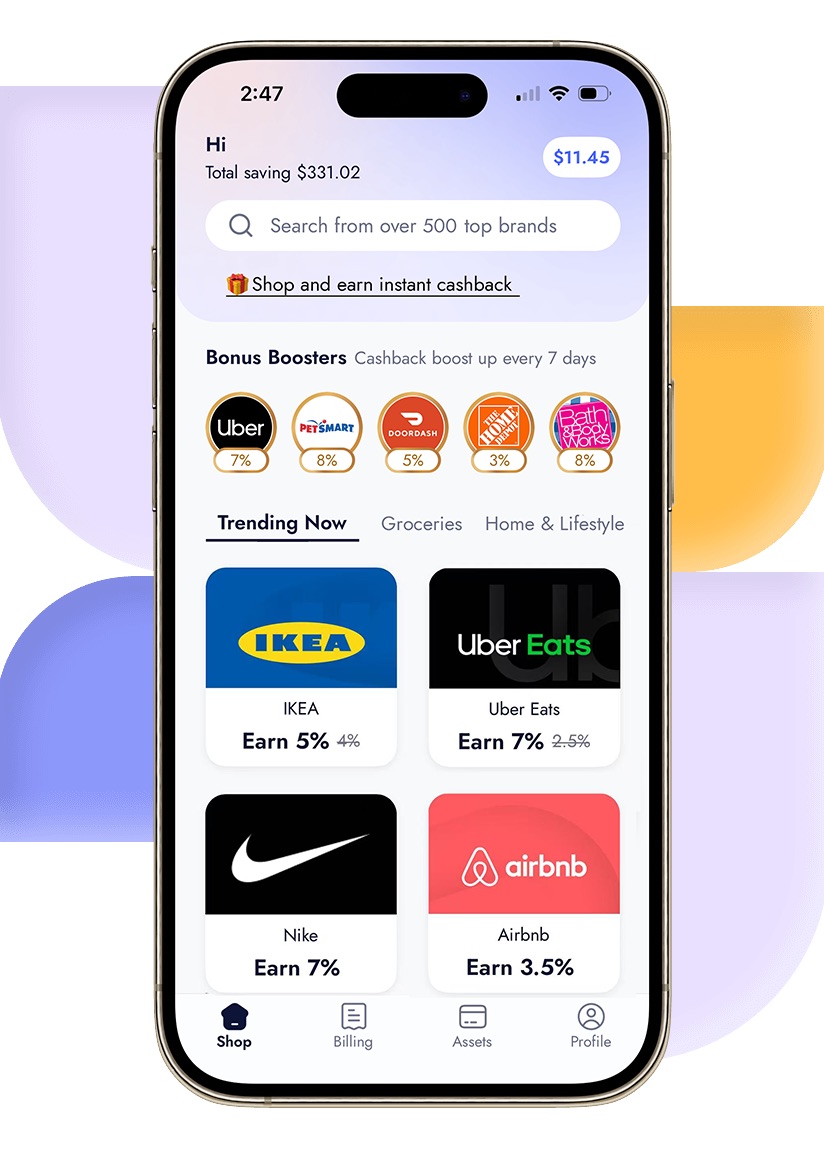
  4. Fintech Asset Managers: Snaplii and similar apps – Gift card-centric, cashback-generating

Each category excels in specific scenarios but falls short in others. The key is understanding which tool to use when.

Part 2: OS Wallets – The “Tap to Pay” Champions

Apple Wallet and Google Wallet dominate the contactless payment space. They’re fast, secure, and universally accepted.

Where They Excel:

  • In-store NFC payments (tap your phone at the terminal)
  • Transit cards and boarding passes
  • Event tickets and loyalty cards
  • Credit/debit card management for everyday purchases

Where They Fall Short:

  • No live balance tracking for stored gift cards
  • No cashback or rewards on gift card purchases
  • Device lock-in – Your Apple Wallet doesn’t transfer to Android
  • Limited gift card support – Only major retailers with Apple/Google integrations

Part 3: Retailer Apps – The Fragmentation Problem

Brand-specific apps like Starbucks offer deep integration with their own ecosystem. The Starbucks app, for example, tracks rewards, shows balance, and allows mobile ordering.

The Problem: This approach doesn’t scale. Managing 10 different retailer apps means 10 logins, 10 notification streams, and no unified view of your total stored value.

For consumers who frequent many different stores, retailer apps create digital clutter without providing holistic financial visibility.

Part 4: Fintech Asset Managers – The Emerging Category

Fintech Wallet Asset Management

Strengths: This emerging category treats gift cards not as static coupons, but as liquid cash. These wallets allow you to buy, store, check balances, and spend from a single dashboard, often generating yield (cashback) on every transaction.

Key Features of Fintech Wallets:

  1. Instant Balance Visibility: See exactly how much you have across all your cards in one place.
  2. Top-Up Capability: Want to buy something for $50 but only have that $1.42 card? In a Fintech wallet, you can buy a new card for $48.58, combine the codes (on the merchant site), and clear out your digital clutter.
  3. Archive: Once a card hits $0.00, you swipe to archive it. It keeps your transaction history clean without cluttering your view.

Part 5: The “Command Center” for Online Shopping

Let’s walk through a typical online shopping workflow to see which wallet offers better management.

Scenario: You are buying a $120 pair of sneakers from Foot Locker.

Approach A: The Traditional Route

  1. Go to Foot Locker site.
  2. Add to cart.
  3. Type in Credit Card.
  4. Result: You paid $120. You exposed your data. You earned 1% credit card points ($1.20).

Approach B: The Managed Wallet Route (Snaplii)

  1. Go to Foot Locker site. Total is $120.
  2. Open Snaplii. Buy Foot Locker card for $120.
  3. Earn 8% Instant Cashback ($9.60).
  4. Copy/Paste code into Foot Locker.
  5. Result: You paid $110.40 net. You kept your credit card private. You have a record of the purchase in your wallet app.

Conclusion: The Managed Wallet route requires 15 seconds of extra work but provides 8x the financial return and superior data privacy.

Part 6: Why “Cross-Platform” Matters in 2026

Another factor often overlooked is device lock-in.

  • Apple Wallet is useless if you switch to Android or want to share a card with a spouse who uses a Samsung phone.
  • Google Wallet faces similar restrictions on iPhones.

The Third-Party Advantage: Independent Fintech wallets like Snaplii are device agnostic.

  • You can access your assets from an iPad, an Android phone, or a web dashboard.
  • If your phone breaks and you have to use a loaner device, you simply log in and your money is there.
  • Family Sharing: You can screen-share or copy a code to a family member regardless of what phone they use. In a household that manages finances together, this neutrality is essential.

Part 7: Industry FAQ

Q: Can I store physical gift cards in a digital wallet?

Currently, our app does not support manually inputting or storing physical gift cards. Only digital gift cards purchased or issued within the app can be stored and tracked.

Q: What happens if the wallet app company goes out of business?

This is a valid concern. With a “Non-Custodial” wallet (where you just store numbers), the risk is low. You still own the valid code for the retailer (e.g., Target). You would simply lose the “interface,” not the money. Always choose wallets that allow you to export or view the full card details (Number + PIN) so you can back them up.

Q: Is it safe to link my bank account to these wallets?

We generally recommend linking a Credit Card rather than a direct bank transfer (ACH). Credit cards offer federal fraud protection and chargeback rights. While reputable fintech apps use bank-grade encryption, adding a layer of separation (the credit card) is a best practice for online security.

Q: How do I track my total spending across different brands?

Currently, our app does not generate automatic monthly reports summarizing gift card spending across brands. You can view the balance of individual digital gift cards, but aggregated monthly summaries are not available.

Part 8: Conclusion – The Hybrid Future

So, which wallet is “Best”?

The reality of 2026 is that you need a Hybrid Strategy.

  1. Use Apple/Google Wallet for your underlying credit cards and boarding passes. It is unbeatable for “Tap to Pay” speed at a subway turnstile.
  2. Use a Fintech Asset Manager (like Snaplii) for your Online Purchases and Gift Card Management.

Why? Because Apple/Google are designed to help you spend money (frictionless payment), while Asset Managers are designed to help you save money (cashback and organization).

If your goal is simply to pay fast, stick to the OS default. If your goal is to manage your digital assets, protect your privacy online, and earn a 5-15% return on your spending, you need a dedicated tool.

Take control of your digital assets. Evaluate your current wallet setup. If it’s just a graveyard of static passes, it might be time to upgrade to an active management platform like Snaplii.

Visit Snaplii US Website