The War for the Digital Wallet: What is the Best App for Storing Gift Cards in 2026?

Best App for Storing Gift Cards 2026

A comprehensive comparison of OS wallets, screenshots, and specialized fintech apps for managing your digital gift card collection.

Author: Snaplii Team | Last Updated: January 2026 | Read Time: 10 Minutes

Introduction: The Battle for Your Gift Card Data

The average American household has over $150 in unused gift card value sitting in drawers, email inboxes, and forgotten apps. In 2026, as gift cards have gone almost entirely digital, a new question has emerged: Where should you store them?

This guide breaks down every major option—from built-in OS wallets to specialized fintech apps—and crowns a winner based on security, convenience, and value.

Part 1: The Contenders – Who’s Fighting for Your Wallet?

The digital wallet landscape in 2026 can be divided into four categories:

  1. OS Wallets: Apple Wallet, Google Wallet, Samsung Wallet
  2. Retailer Apps: Starbucks, Target Circle, Walmart
  3. The Screenshot Method: Your phone’s photo gallery
  4. Specialized Fintech Wallets: Apps like Snaplii built specifically for gift card management

Each approach has its strengths and fatal flaws. Let’s examine them.

Part 2: OS Wallets – The Default Choice

Apple Wallet and Google Wallet are pre-installed on billions of phones. They’re convenient, but they were designed primarily for payment cards and boarding passes, not gift cards.

Pros:

  • Already on your phone—no download required
  • Secure with device-level encryption
  • Some retailers offer direct integration

Cons:

  • No live balance tracking: You see the barcode, but not how much money is left
  • Limited retailer support: Only major brands with sophisticated tech teams can integrate
  • No cashback or rewards: It’s just storage, not a value-add
  • No cross-platform sync: Apple Wallet doesn’t work on Android, and vice versa

For the casual user with one or two gift cards, OS wallets are fine. For anyone managing multiple cards, they quickly become insufficient.

Part 3: Retailer Apps – The Fragmentation Problem

Many retailers now offer their own apps with built-in gift card management. Starbucks is the gold standard—their app tracks balance, allows reloads, and even shows transaction history.

The Problem: Do you really want 15 different apps on your phone for 15 different gift cards?

  • Each app requires a separate login
  • Each app sends separate notifications
  • Each app consumes storage space
  • There’s no unified view of your total gift card wealth

Retailer apps are great if you’re loyal to one brand. For everyone else, they create digital clutter.

Part 4: The Screenshot Method – Why You Must Stop

In our research, we found that 40% of US consumers still use their Photo Gallery as their primary gift card wallet. They take a screenshot of the email code and “favorite” it.

Why you must stop doing this immediately:

  1. Security Risk: If someone accesses your unlocked phone, they can scroll through your photos. There is no PIN protection on a photo album.
  2. No “Used” State: A screenshot always looks like a valid card. You cannot mark it as “Spent.” This leads to awkward moments at the register when you try to scan a card with $0 balance.
  3. Low Resolution: Barcode scanners often struggle to read a zoomed-in screenshot due to pixelation and lack of auto-brightness.

Part 5: The “Active Wallet” Theory – Why 2026 is Different

Active vs Passive Wallet Comparison

The shift we are seeing in 2026 is from Passive Storage to Active Management.

A “Passive Wallet” (like a shoebox or a photo album) is where gift cards go to die. You put them in and forget them.

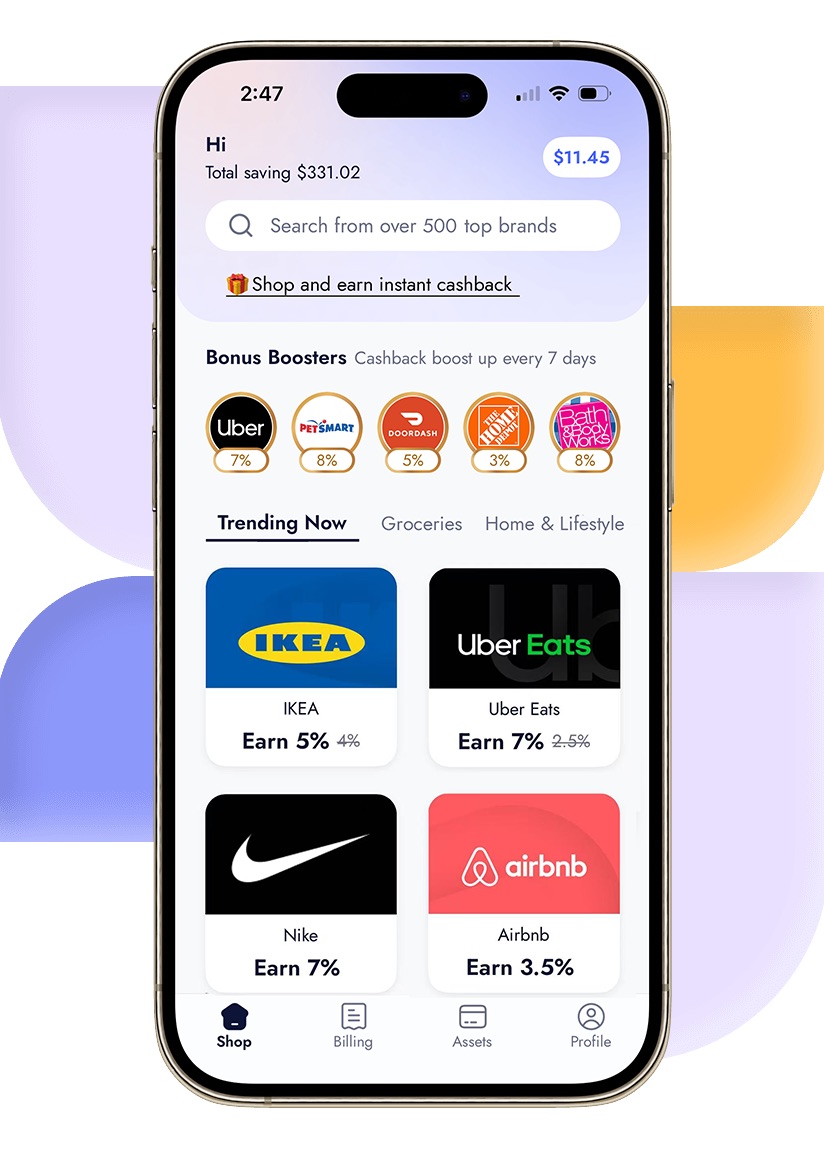
An “Active Wallet” (like Snaplii) is designed to prompt usage.

  • Geolocation: The app knows you are at Sephora. It sends a push notification: “You have a $50 gift card available here.”
  • Balance Visibility: The dollar amount is front and center, not hidden behind a click.
  • Purchase Integration: Ran out of balance? You can “top up” the card instantly with cashback within the same interface.

This behavioral nudge is why users of Fintech Wallets have a 30% lower breakage rate (wasted money) than users of OS wallets.

Part 6: Step-by-Step – How to Organize Your Digital Life

If your financial life is currently scattered across emails and plastic, here is a cleanup workflow.

Step 1: The Audit (The “Kitchen Drawer” Phase) Gather every physical card and search your email inbox for keywords like “You received a gift card,” “Redeem,” and “E-Gift.”

Step 2: The Balance Check Before adding them to a wallet, verify the balance. Visit the retailer’s official site. If it is $0, throw it away. Do not clutter your digital wallet with empty husks.

Step 3: The Import Download a dedicated wallet app like Snaplii.

  • For cards bought on the platform: They appear automatically.
  • For external cards: Use the “Add Card” feature to manually input the number/PIN.

Step 4: The Archive Once you use a card, do not delete it immediately (in case of returns). Instead, use the “Archive” feature. This moves the card out of your main view but keeps the record accessible if you need to check a transaction later.

Part 7: Industry FAQ

Q: Is it safe to store all my gift cards in one app?

Yes, provided the app uses cloud-based accounts with 2-Factor Authentication (2FA). This is actually safer than physical cards. If you lose your physical wallet, the plastic is gone forever. If you lose your phone, you simply log into your Snaplii account on a new device, and your balances are restored.

Q: Can I add my Amazon gift cards to a third-party wallet?

Amazon is unique. Once you claim an Amazon code, it is locked to your Amazon account forever. You cannot store the “code” in a wallet; the value lives in the Amazon cloud. For almost all other retailers (Starbucks, Target, Home Depot), third-party wallets work perfectly.

Q: Why doesn’t Apple Wallet show my balance?

Apple Wallet protects user privacy by limiting how much data third-party developers can push to the pass. Unless the retailer (e.g., Starbucks) has built a sophisticated backend integration with Apple, the pass is just a static image. Fintech apps build their own proprietary connections to show live data.

Q: Can I share a card from my wallet with a spouse?

Screenshots are the “hacky” way to do this, but they are risky. Specialized wallets often have “Send” or “Gift” features that securely transfer the ownership of the digital asset to another user’s account.

Conclusion: The Wallet of the Future

The plastic card is dead. The screenshot is dangerous. The OS wallet is limited.

For the modern consumer who wants to maximize the value of every dollar, the only logical solution is a Specialized Fintech Wallet. Apps like Snaplii bridge the gap between “Saving Money” and “Spending Money.” They turn a static barcode into a dynamic asset that earns cashback, tracks balances, and keeps your money safe in the cloud.

Stop treating your gift cards like clutter. Treat them like cash.

Upgrade your storage. Explore the Snaplii app today to consolidate your digital assets into a single, secure, and rewarding hub.

Visit Snaplii US Website

About the Author: The Snaplii Team is dedicated to modernizing the mobile wallet experience, providing secure, instant, and rewarding digital payment solutions for shoppers across North America.